The daily email
OpenTrading can send a position-aware pre-market brief on a schedule — a styled, Outlook-safe HTML email built from the same tools the dashboard uses.
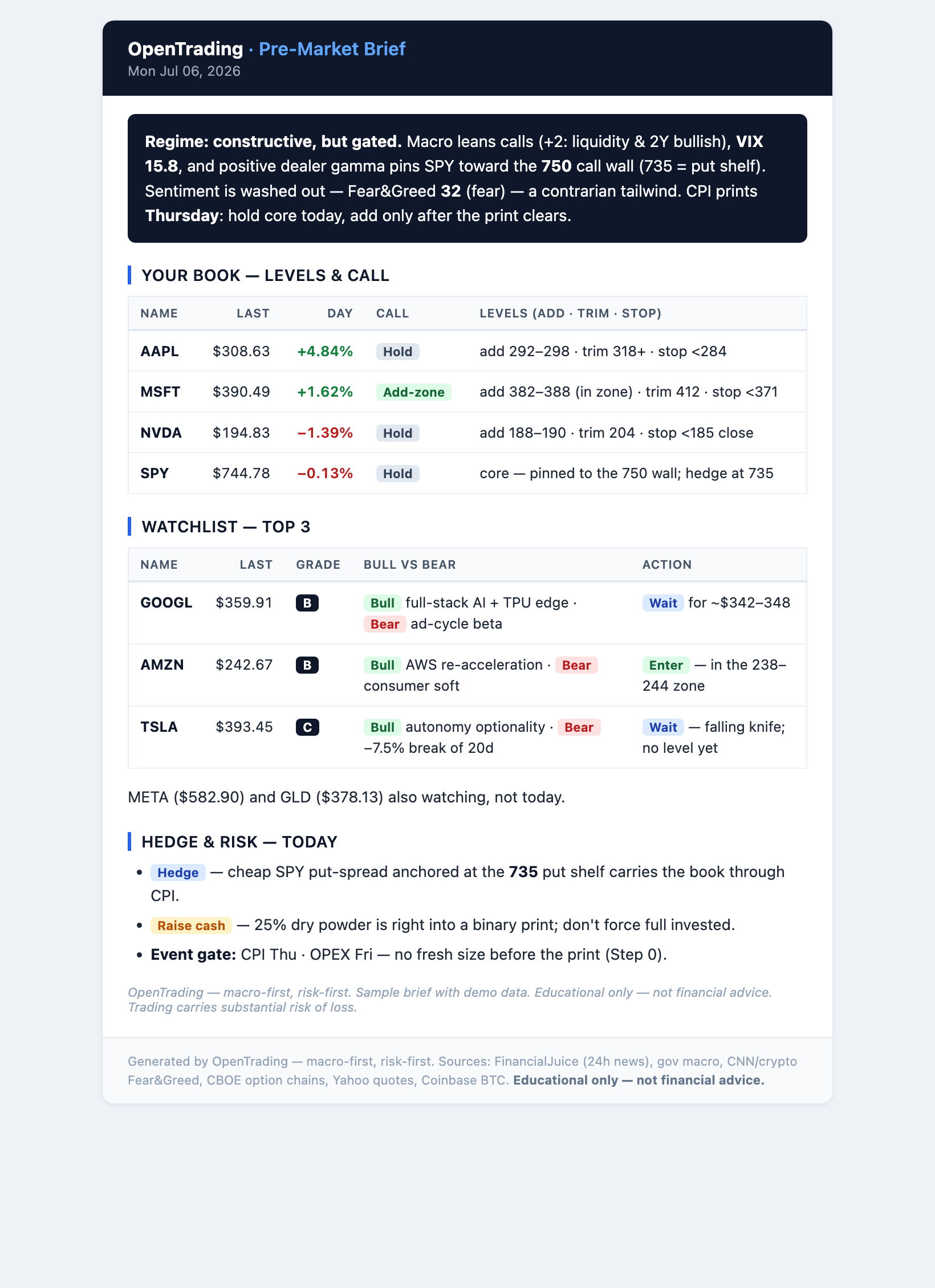
What's in it
- a regime banner (macro × tape × smart money)
- your positions table, $-weighted
- sections for macro, smart money, options / dealer gamma, 24h news, concentration
- the desk's Top-3 for the day (from
ot rank), each graded with a buy-now / wait-for-price action
One-off preview
Render it to a file without sending:
OT_EMAIL_RENDER_ONLY=1 OT_EMAIL_HTML_OUT=/tmp/brief.html \
  bash tools/brief/daily_email_claude.sh
open /tmp/brief.html
Sending
Email goes out over SMTP using credentials in your git-ignored .env (copy
.env.example first). Pick one provider — the preset sets host/port/security
automatically. Two easy, free options:
Option A — Gmail (email anyone, incl. overseas)
Recommended: it delivers to any address (including qq.com / overseas). You need a Google app password, not your login password:
- Turn on 2-Step Verification on your Google account.
- Open myaccount.google.com/apppasswords and create a 16-character app password.
- Set these in
.env:
| Key | Value |
|---|---|
OT_SMTP_PROVIDER | gmail |
OT_SMTP_USER | your full Gmail address |
OT_SMTP_PASS | the 16-char app password |
OT_EMAIL_FROM | your Gmail address |
OT_EMAIL_TO | where the brief is delivered |
Option B — Resend (email yourself, zero SMTP fuss)
Easiest if you only need your own inbox. The free tier sends from
onboarding@resend.dev and delivers only to your Resend-account email — to
reach other people you verify a domain at resend.com/domains.
- Sign up at resend.com, then create an API key at resend.com/api-keys (starts with
re_). - Set these in
.env:
| Key | Value |
|---|---|
OT_SMTP_PROVIDER | resend |
OT_SMTP_USER | the literal resend |
OT_SMTP_PASS | your API key (re_…) |
OT_EMAIL_FROM | onboarding@resend.dev (or your verified domain) |
OT_EMAIL_TO | your Resend-account email |
Then send a one-off:
ot email # sends the current report to OT_EMAIL_TO
:::note Outlook / personal Microsoft
Microsoft disabled app-password SMTP for personal accounts, so the
outlook/office365 presets won't work for personal mail — use Gmail or Resend.
:::
Scheduling
On macOS, install a launchd job:
ot schedule email 6 0        # every weekday at 06:00 local time
ot schedule email uninstall  # remove it
For multiple rosters (e.g. a US book and an A-share / HK book on different
schedules and languages), OpenTrading ships a roster mailer that fans out over
every watchlist*.json, emailing each to its own recipient in its own lang:
ot schedule roster us        # US rosters, weekday pre-market
ot schedule roster cn        # A/HK rosters, aligned to China pre-market
:::note Language rule Each email is single-language: an English book gets English, a Chinese roster gets 中文 — never mixed in one message. :::